Local inference becomes an agent only when a complete loop works: a request reaches the local server, the model calls a tool, its result returns to the model, and the conversation stays within context. A successful chat reply is only the first check.
This article records Windows tests on October 13, 2026, published on October 14. Installed versions were Goose 1.54.0 and OpenCode 1.19.0. Paths below are generic; local-only is a placeholder for the local interface, not a cloud credential.
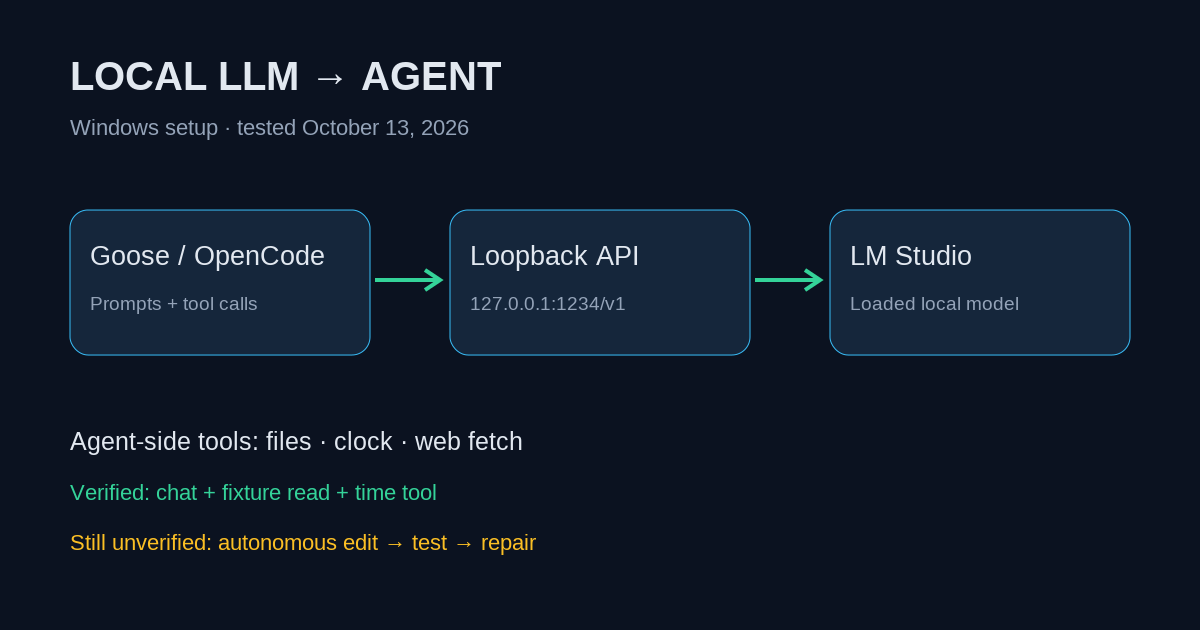
What passed, and what remains unverified
| Check | Observed result | Meaning |
|---|---|---|
/v1/models | HTTP 200 | Endpoint available; listed models are not necessarily loaded |
| Basic Goose and OpenCode chat | Z13_LOCAL_OK | Local inference works |
| Synthetic file read | Both returned LOCAL_AGENT_7319 | A tool call and result round trip worked |
| Default OpenCode launch | Z13_DEFAULT_OK | Global configuration took effect |
| Current time | z13_time called successfully | No file search needed |
| GitHub Trending | Page fetched; summary needed intervention | Partial research workflow only |
| Real code edit, test and repair | Not completed in this round | No claim of commercial-agent parity |
The tested model ID was huihui-qwen3.8-flash-next-abliterated, with roughly 75.97GB of weights. Abliteration changes refusal behavior; it does not establish superior coding quality. We did not run a comparative quality benchmark.
Hardware was a 128GiB ASUS Z13 with Ryzen AI Max+ 395 and Radeon 8060S, retaining a 96GB GPU allocation. CPU-visible memory was approximately 31.65GiB. These allocations share the same physical memory pool.
Verify LM Studio independently first
Load the model and start the local server on 127.0.0.1:1234. The retained configuration in this round was 8192 context, parallel 4; this is an observed configuration, not a universal recommendation.
Invoke-RestMethod http://127.0.0.1:1234/v1/models
$payload = @{
  model = 'huihui-qwen3.8-flash-next-abliterated'
  messages = @(@{ role = 'user'; content = 'Reply exactly Z13_LOCAL_OK' })
  max_tokens = 32
  stream = $false
} | ConvertTo-Json -Depth 6
Invoke-RestMethod -Method Post `
  -Uri http://127.0.0.1:1234/v1/chat/completions `
  -ContentType 'application/json' -Body $payload
Copy the exact model ID returned by the API. If this fails, check the server, port and loaded model before involving agent prompts or tools. See LM Studio compatibility documentation.
Goose: the 401 was a wrong-host request
The original Goose session displayed a local model name but sent its request to api.openai.com, receiving 401 without a cloud key. Selecting a model does not select the host. The following condensed launcher routes the OpenAI-compatible adapter to the local endpoint:
$env:OPENAI_HOST = 'http://127.0.0.1:1234'
$env:OPENAI_BASE_PATH = 'v1/chat/completions'
$env:OPENAI_API_KEY = 'local-only'
$env:GOOSE_CONTEXT_LIMIT = '8192'
$env:GOOSE_MODE = 'approve'
$env:GOOSE_TELEMETRY_ENABLED = 'false'
goose run --provider openai `
  --model huihui-qwen3.8-flash-next-abliterated `
  --no-profile --no-session --with-builtin developer `
  --interactive --text 'Reply exactly Z13_LOCAL_OK'
Goose's host here omits /v1; OpenCode's base URL below includes it. Environment variables apply to this process and its children, not an unrelated new terminal. Consult Goose environment variables.
The built-in developer shell successfully read our synthetic text fixture with a read-only Get-Content command. An earlier attempt used an image tool for text and failed. A separate custom Python MCP extension failed before initialization twice; it is not a verified part of this setup.
OpenCode: make the normal launch use the same settings
An isolated launcher and a plain opencode command can read different configuration sources. We added the local provider and compact agent to %USERPROFILE%\.config\opencode\opencode.jsonc, backing up and preserving existing content.
The minimal reference below combines the options used in this round. Merge fields into existing configuration rather than replacing it, and substitute your actual model ID.
{
  "$schema": "https://opencode.ai/config.json",
  "model": "z13-local/huihui-qwen3.8-flash-next-abliterated",
  "small_model": "z13-local/huihui-qwen3.8-flash-next-abliterated",
  "default_agent": "z13-code",
  "provider": {
    "z13-local": {
      "npm": "@ai-sdk/openai-compatible",
      "options": {
        "baseURL": "http://127.0.0.1:1234/v1",
        "apiKey": "local-only"
      },
      "models": {
        "huihui-qwen3.8-flash-next-abliterated": {
          "name": "Local Qwen",
          "tool_call": true,
          "limit": { "context": 8192, "output": 2048 }
        }
      }
    }
  },
  "agent": {
    "z13-code": {
      "mode": "primary",
      "prompt": "Be concise. For date/time call z13_time; never glob to infer time. Search only the requested project. Read short relevant slices. Inspect code before edits. Do not access credentials or publish.",
      "tools": {
        "*": false, "read": true, "glob": true, "grep": true,
        "edit": true, "write": true, "z13_time": true
      },
      "permission": {
        "*": "ask", "read": "allow", "glob": "allow",
        "grep": "allow", "edit": "ask", "write": "ask",
        "z13_time": "allow"
      }
    }
  },
  "compaction": { "auto": true, "prune": true, "reserved": 1024 }
}
Actual tests also used separate no-tool, file-read and web agents. tool_call: true declares a capability; it cannot teach an incapable model to use tools. Start a fresh session and verify it. Windows path permission matching may require attention to both slash styles. See providers and agents.
Why a tiny greeting exceeded 8K
One initial request contained 11,458 input tokens; a later user hi request contained 11,816. Both exceeded 8192. System prompts, tool schemas, history and tool results count too.
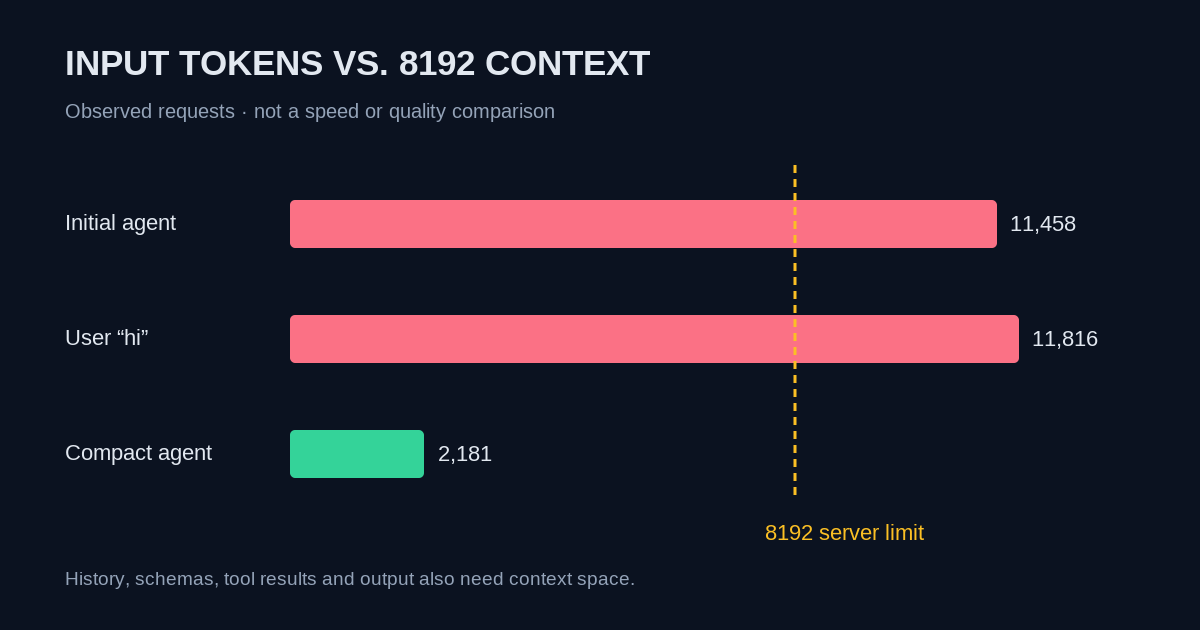
Reducing the prompt and tool set, using a fresh conversation, limiting tool results and enabling compaction brought one default-launch test down to 2181 input tokens. It completed, but this does not guarantee long tasks will fit.
Client context metadata does not resize the loaded server. Output, reasoning and subsequent tool responses need room as well. Compaction helps history; it cannot fix an oversized initial request.
We actually reloaded 32768 context/parallel 1 and 16384/parallel 1, then restored 8192/parallel 4. Host-available memory samples were about 617.5MiB, 251.2MiB and 1318.0MiB, respectively. These are different-time snapshots, not peaks, steady-state values or a controlled comparison. They show little headroom in this round, not a universal ordering of memory requirements. A smaller model or another runtime configuration needs its own quality and memory measurements.
Use a clock tool for time
The original date question triggered Glob "*", returned 100 matches and then exceeded context. Create %USERPROFILE%\.config\opencode\tools\z13_time.js:
export default {
  description: "Return current date and time in Asia/Taipei",
  args: {},
  async execute() {
    const now = new Date();
    return JSON.stringify({
      timezone: "Asia/Taipei",
      local_datetime: new Intl.DateTimeFormat("sv-SE", {
        timeZone: "Asia/Taipei",
        year: "numeric", month: "2-digit", day: "2-digit",
        hour: "2-digit", minute: "2-digit", second: "2-digit",
        hour12: false
      }).format(now),
      utc_iso: now.toISOString()
    });
  }
};
This plain JavaScript tool was tested successfully. After restarting, the same Chinese question called z13_time without glob and returned 2026-10-13 23:49:30 Asia/Taipei. That is a historical test result, not the reader's current time; it depends on the system clock being correct. See custom tools.
Trending exposed the remaining workflow gap
A separate webfetch/read agent fetched GitHub Trending. Navigation and language lists consumed output space; the response was truncated and saved to a tool-output file. Human intervention adjusted read permissions and supplied offset 178/limit 50.
One summary was cut off during its fourth project. Another ran for over three minutes without finishing and was stopped. Fetching and reading fragments worked; autonomous research did not complete. Pre-extracting short structured repository records is a proposed improvement, not a measured success. Local inference does not make web research offline.
Progress toward daily coding in four checks
- Verify the endpoint with a fixed short answer.
- Read an unknown verification code from a synthetic file.
- Inspect and edit a small reversible test project; review the diff.
- Run bounded tests, read concise errors, repair and retest; measure correctness, latency and human intervention.
The compact OpenCode agent above has no bash tool enabled, so it cannot yet run tests on its own. Command execution needs a separately configured and verified scope. Reading files is not evidence of a complete coding loop.
With 8K, a small task, relevant file slices and short results are a sensible starting point. Whether this approaches a cloud-backed coding agent's experience still requires a same-task comparison. This round establishes local connectivity and selected tool calls, with honest evidence of what remains incomplete.