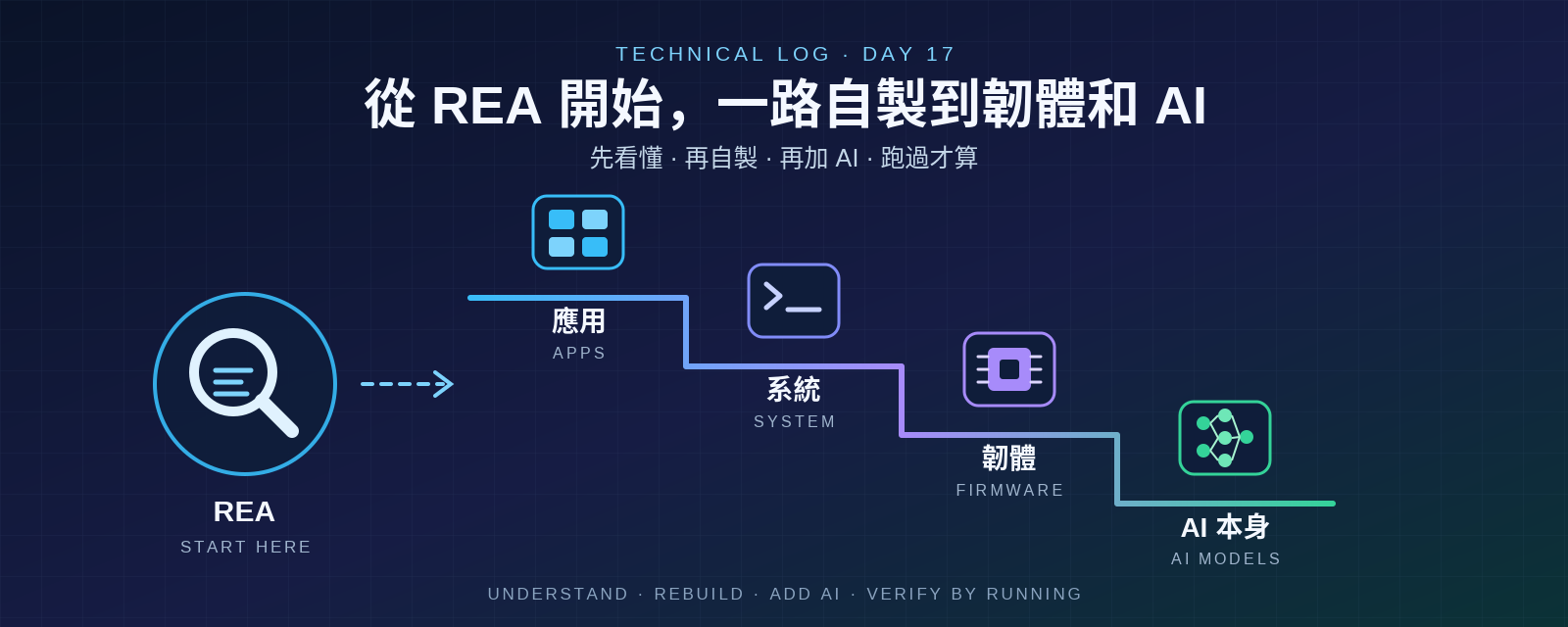
In one line: the direction of this series is set. Start from REA: use AI reverse engineering to understand the apps I use every day, then build my own versions one at a time and add AI or automation, working down from apps to the system, firmware and finally AI models themselves. Each layer counts only when its acceptance check has actually run.
Progress today: Series direction | Plan | Status: the four-layer route, each layer's first deliverable, the per-app loop and evidence ledger, selection criteria, acceptance checks, risks and red lines are set; tomorrow I run REA on my own machine for the first time.
What Happened
Sixteen days in, I looked back at the table of contents and the topics had drifted: a security foundation, AI agents, a security landscape, energy, robots, algorithms, long-term care, biomedicine, local LLMs, interpretability. Each post is useful on its own, but together they did not say what this series is actually trying to build.
Two posts made it click. The deep dive into REA and Ghidra showed me that AI reverse engineering can now turn "how does this program actually work" into evidence you can check step by step. Day 15 hit its limit: REA can take apart the software that runs a model, but not the model itself.
Put those together and you get a route: understand first, then build my own. Start with the apps I touch every day and work down through the system and firmware to AI itself.
I first thought about starting a new series. Then I placed the first 16 days on this route one by one and found that most of them fit, with only a few being background research. So I kept it in the Technical Log, and the series intro now reflects this direction at the bottom of every post.
Understanding and rebuilding everyday tools
Running apps on my own machines
Microcontrollers, sensors, robots
Opening models to see how they compute
Helped set the direction
A Method Anyone Can Use
This is not only for engineers: before replacing a tool you use every day, understand it first, then decide which small piece to build yourself.
- Write down the three to five tools you really open every day.
- Ask three questions about each: what does it do for me, which step is most annoying, and who holds my data?
- Pick the one that is most annoying but cheapest to get wrong, replace only that one step with your own approach, and use it for a week.
- Only if you still want it after a week, add features or automation.
- Each time you replace a piece, write one line: what you replaced, what you saved, what got harder. After a month you will see which pieces are worth continuing.
How different readers can apply it:
- If you don't write code: use a spreadsheet, phone shortcuts or an off-the-shelf automation service to connect that one annoying step. The key is question 2: find out what the original tool quietly does for you, such as automatic backups or syncing to other devices.
- If you write code: build the smallest usable version first, and make sure the data can be exported so your own tool doesn't lock you in. The original tool's export feature is often the best spec you will get.
- If you want to learn the lower layers: follow the four layers below from apps downward. Every layer has something to take apart and measure, and what you build in one layer becomes the test subject for the next.
Technical Details
The Four-Layer Route
The order has a reason: what I build in one layer becomes the test subject for the next. My own apps have to run on my own system; once the system connects to sensors and machines, it reaches firmware; and every bit of AI used in those layers eventually raises the question "how did it actually reach that answer?", which is layer four.
The First Deliverable for Each Layer
"Down to firmware" is too vague on its own, so each layer gets a first step that can be built and checked.
Layer 1 Apps
- First deliverable: check the tool itself first. Use REA to investigate three small programs I wrote myself, whose answers I know, and measure how well it does (details under "The First Experiment Tomorrow" below). Only once the tool is trustworthy do I point it at an app I actually want to replace.
- Candidates for the first app: Stage 2, "moving into daily life", of Day 1 already listed everyday tasks, so I pick from that list instead of inventing new ones: a morning briefing (today's schedule, to-dos and reminders), photographing receipts for automatic bookkeeping, article and paper summaries, and phone queries and reminders. Which comes first will be decided with the criteria below after REA passes its check.
- Routes REA can take: REA picks an analysis approach based on the kind of program. For Electron desktop apps it can trace from the interface to the code that handles it; for .NET programs it can read the structure without running them and compare two versions; for websites it can record the page events and requests that actually happened over a period; for firmware and Android packages it first extracts the components, then hands each to the right tool.
Layer 2 System
- First deliverable: run the first home-built app on my own machines, meeting the Day 1 security foundation: controlled outbound connections, least privilege, centrally kept keys, and signed records for important actions.
- Acceptance follows Day 1: for 14 consecutive days, the system completes at least 3 real everyday tasks per day; every failure triggers a notification, and nothing "looks successful but was never done".
- Machine roles: Day 14 estimated how large a model the 128GB Z13 can run with 96GB given to the GPU, and Goose and OpenCode can already be driven by a local model. Private data goes to local models first.
Layer 3 Firmware
- First deliverable: following the order in Day 7, first define a fixed grasping task, list the parts, get it working in simulation, and only then buy the first board. Day 7 has a 12-week sample plan: weeks 1–2 define the task and parts list, weeks 3–6 build the gripper and calibration, and only weeks 10–11 add one AI perception feature, compared against a version without AI.
- How REA helps here: analyse the firmware of devices I own by first extracting its components and recording each component's hash and origin, then handing each to the right analysis tool. That is the only way to answer "which firmware version did this evidence come from?"
- No body contact first: Day 7 and Day 12 reached the same conclusion: start with tasks that don't touch people, and leave lifting or feeding alone for now.
Layer 4 AI itself
- First deliverable: already under way. The Day 15 eight-week plan has one question and one ground truth per week, and Day 16 completed week one's logit lens experiment.
- Machine roles follow Day 15: the Mac (Apple M5, 24GB) runs small models such as GPT-2 small and Qwen2.5-0.5B for the first weeks; the Z13 runs models that need more memory.
- How it relates to the layers above: any AI feature used in the first three layers can eventually be brought here and asked what it bases its judgements on.
Why Start with REA
- Understanding is cheaper than rewriting. Without first understanding how the original app works, my own version can easily miss key behaviour such as background sync, automatic backups or error retries.
- It keeps the evidence. REA connects the investigation workflow to various tools, Ghidra provides the program-analysis foundation, and a large language model proposes hypotheses and decides what to look at next. Each has its own sources of error, and REA's results record "what the tool found" separately from "which settings the analysis used". That is exactly what I learned in Day 3 and Day 11: an AI saying it understands does not count; evidence you can look up does.
- It spans three of the layers. The same toolset can look at apps and follow a firmware route, and it stops exactly at AI models, which tells me where to switch tools.
One thing to admit up front: the REA post was an analysis of documentation and source code, and I have not yet run REA on my own machine. So the first step is not picking an app but getting REA running and measuring how well it answers on programs whose answers I already know.
The Same Loop for Every App
Choose one using the criteria below
List what it does, with evidence for each item
Only the parts I need, no copying
Exportable data, works offline
Decide how to measure first, or skip it
Done only if it really replaces the old tool
A few details:
- The output of understanding is an evidence ledger (format in the next section). Anything without evidence is marked as a guess.
- The spec covers only the parts I actually need. The goal is not to copy someone else's product but to build a tool that fits my own habits.
- When building the minimal version, each step is cut down to something I can finish in one evening. If it doesn't fit, I split it further rather than stay up forcing it.
- Before adding AI, I write down how to measure it, for example classification accuracy or steps saved each time. A feature I cannot say how to measure does not get added yet.
- After a week of use, if I have gone back to the original tool, I write down why. That is a result too.
What the Evidence Ledger Looks Like
When understanding an app, every claim of the form "it does X" must map to a piece of evidence. The format:
| Claim | Evidence | Where the evidence came from | Status |
|---|---|---|---|
| Pressing Export writes a file | Call path and addresses | Which file of which version, found with which tool and settings | Confirmed |
| It checks for updates at start-up | An observed network request | Which observation, over what time window | Confirmed, limited to this observation |
| Data syncs in the background | Only related strings seen | Which search, over what range | Guess |
| Whether there is a local cache | Not checked yet | None | Unknown |
Only four statuses are used: confirmed, confirmed with a limited scope, guess, unknown. "Unknown" is a legitimate answer and beats a plausible-sounding explanation.
Four Misreadings to Avoid
The REA post listed four common mistakes that most easily turn "observed" into "proved":
- No matching string, so the feature doesn't exist. A search only covers data already recognised as strings; compressed content or content created at run time may not appear at all. "Not found" only means not found in that search, over that range.
- No path in the static call graph, so it can't run. Indirect calls often have unresolved targets in static analysis. When no path is found, write "unknown", not "impossible".
- The data flow connects, so I understand the business logic. A value flowing into a file write is not necessarily the user's backup; data flowing to the network does not necessarily contain a password.
- The pseudocode differs between two versions, so the features must differ. Type inference, symbols and decompiler settings all change the text; align versions and settings first, then look at the actual bytes and reproducible behaviour.
One more common mistake: quoting a hexadecimal address without saying whether it is a position in the file or a position after loading into memory. Every address in the ledger must say which kind it is.
How to Pick the First App
Missing one means moving on
Makes acceptance and upkeep easier
Too much risk or legal trouble
Looking at the Day 1 candidates through these criteria (my current judgement, to be settled after REA passes its check):
- Morning briefing: used every day, my own data, and an error at worst means missing one item, so it is cheap to get wrong. The acceptance check is clear too: did the right events and to-dos show up?
- Article and paper summaries: the data is mostly public and errors are cheap, but "is the summary good" is harder to measure.
- Receipt bookkeeping: used every day, but it involves money, so errors cost more. The Day 1 design records first, keeps changes undoable for 24 hours, and only asks me when an amount looks unusual.
- Phone queries and reminders: involves sending things out, which means drafting first and sending with one tap, a longer flow better suited to later.
When Each Layer Counts as Done
| Layer | Done when | How to measure |
|---|---|---|
| Apps | My version replaces the original tool for at least a week | Times used, times I reopened the original, error log |
| System | At least 3 real tasks per day for 14 consecutive days; works offline | Task log, failure notifications, offline test, permission list checked item by item |
| Firmware | One board goes from flashing to stably completing a fixed task | Continuous uptime, whether failures can be reproduced, whether a human can take over |
| AI itself | Each method first reproduces a paper's result before I apply it | The Day 15 ground-truth check |
The First Experiment Tomorrow
The REA post already designed an acceptance round, so tomorrow I follow it. Three small programs I wrote myself, with source code; the source is used only for grading and is never shown to the investigating agent:
| Sample | Question for the agent | Ground truth prepared in advance |
|---|---|---|
| A small function doing bit masks and branches | Explain the bit widths, value ranges and branch conditions | The rules for inputs 0, 7, 8 and extreme values, plus the original instructions |
| A callback chosen through a function pointer | Point out the paths that are settled and the targets that cannot be settled | Build settings, known branches, items that should be marked unknown |
| The same program built with different optimisation or symbol settings | Compare which observable parts changed and which did not | Each file's hash, the source and the build commands |
Record versions of REA, Ghidra, the compiler, the model and the prompt
Store each file's hash; confirm entry points and instructions in Ghidra
Ask about the same target through REA's CLI and MCP
Same question three times, keeping every call and failure
Check answers against the source
Time taken, model usage, number of queries
There is only one pass condition: claims and evidence match, and it knows what it does not yet know. If a run writes a beautiful explanation but cites an address from another version, that is a failure; if it honestly says the original variable names cannot be recovered, that counts as correct.
Risks and Countermeasures
| Risk | How it happens | Countermeasure |
|---|---|---|
| Scope too large | Wanting every layer to be complete | One thing that really works per layer; one app at a time |
| Legal trouble | Analysing software I have no right to analyse | Check the licence first; prefer my own code, open source or software that explicitly allows analysis |
| Security trouble | A home-built app touches private data without protection | Pass the Day 1 security foundation before it enters daily life |
| AI overconfidence | The agent writes guesses as facts | The ledger allows only four statuses; a wrong address fails the grading outright |
| Giving up halfway | After-work time is limited and progress drags | Cut every step down to one evening; when stuck, write it up instead of grinding on |
Red Lines
- Only analyse software I have the right to analyse. Follow licence terms, never bypass protection mechanisms, and never distribute other people's code, assets or keys.
- Security before convenience. Following the Day 1 order, a new app passes permission and data checks before it becomes part of daily life.
- No private data in posts. No keys, internal IPs, hostnames or personal information.
- An AI saying "done" does not count. Every step needs an acceptance check that can be rerun.
Acceptance Status
| Criterion | Result today | Status |
|---|---|---|
| Series direction in one sentence | At the top, and in the series intro at the bottom of every post | Done |
| First 16 days placed | 13 posts placed in the four layers, 3 marked as background research | Done |
| Four-layer route and each layer's first deliverable | See "The First Deliverable for Each Layer" | Done |
| Per-app loop and evidence ledger format | Six steps, four statuses | Done |
| Selection criteria, risks and red lines | Set | Done |
| Tomorrow's experiment design | Three samples, six steps, one pass condition | Done |
| REA running on my own machine | Not started | Not started |
| First app chosen | After REA passes its check | Not started |
Still Open
- Which machine runs REA. The REA post noted that its Ghidra support on Windows is still experimental and read-only, with requirements on the OS version, file system and Java setup. So whether the Z13 can run it directly needs checking first, and the Mac may be the steadier starting point.
- The first app is not chosen yet. The current front-runner is the morning briefing.
- Which development board to buy for the firmware layer. That waits until the app layer has produced something usable.
- Four layers sounds big. For now I accept "one thing that really works per layer", not completeness.
Takeaways
- Before building your own tool, write down what the original does, with evidence for each item.
- Evidence has only four statuses: confirmed, limited scope, guess, unknown. "Unknown" is a legitimate answer.
- "Not found" is not "doesn't exist", and "no path" is not "impossible".
- Replace one small piece at a time, and use it for a week before deciding whether to continue.
- Decide how to measure an AI feature first; if you can't measure it, don't add it yet.
- Only take apart what you have the right to take apart.
Tomorrow
Following the design above, run REA on my own machine for the first time: three small programs I wrote, the same question run three times by the agent, graded against the source, recording accuracy, where it went wrong and how long it took.